Claude Code Gets a Multi-Agent Command Center — and It Changes How AI Development Works
Anthropic shipped a major redesign of Claude Code’s desktop app in April 2026, and the headline feature says a lot about where AI-assisted development is heading: the entire interface is now organized around managing multiple AI agents at the same time.
This isn’t a cosmetic refresh. It’s a structural rethinking of what a coding tool is for in 2026 — and it has real implications for how development teams will work.
Key Takeaways
- Claude Code’s April 2026 redesign centers on a persistent sidebar for parallel agent sessions.
- You can run multiple agents simultaneously — each on its own task, with its own context.
- Drag-and-drop layout lets you monitor all active agents without switching windows.
- Claude Code now competes directly with Cursor, Windsurf, and GitHub Copilot Workspace on orchestration.
- The developer role shifts toward supervision and quality judgment as agents handle execution.
What Changed in the April 2026 Redesign?
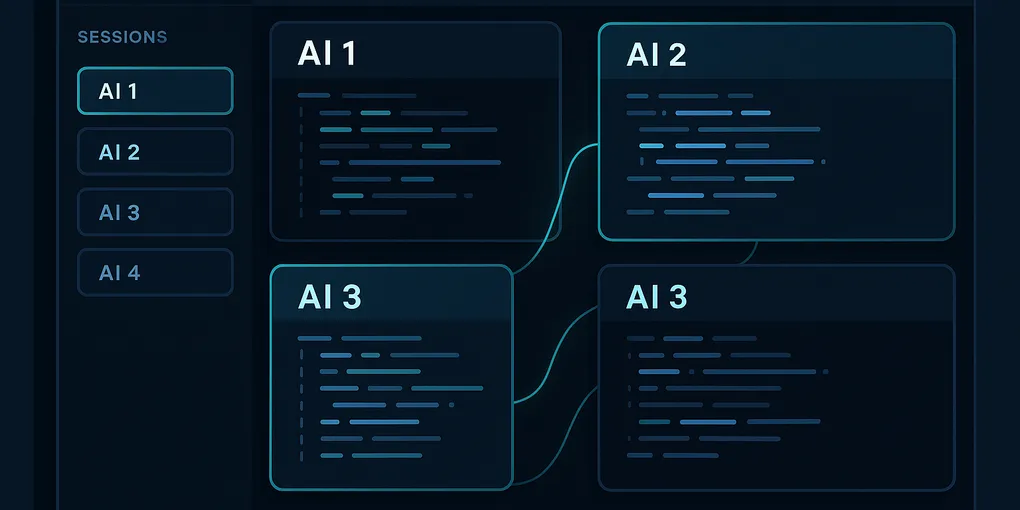
The biggest change is a persistent sidebar for concurrent agent sessions. Instead of working with one Claude instance at a time, you can now have multiple agents running in parallel — each with its own task, context, and progress state — visible in a unified panel.
Drag-and-drop layout customization lets you arrange those agent windows however your workflow demands. Working on a frontend task, a backend task, and a documentation update simultaneously? Each gets its own panel, and you can glance across all three without switching contexts.
The redesign also brings better session management — you can name, pause, resume, and archive agent sessions — which starts to look less like a chat interface and more like a project management board where AI agents are the workers.
Why Is Multi-Agent the Right Model Now?
Until recently, “AI coding assistant” meant one model, one task, one response at a time. You asked Claude or Copilot to do something, it answered, you moved on. Useful — but fundamentally still you doing the work with AI help.
Multi-agent changes the equation. Instead of one assistant, you have a team:
- One agent refactoring a module
- Another writing tests for the new version
- A third updating the API documentation
- A fourth scanning for regressions in adjacent code
All running concurrently, with you overseeing and steering rather than executing each step manually. Claude Code’s new layout is built to make that orchestration visible and manageable — not a background black box.
This mirrors what’s happening in enterprise AI more broadly: the most productive teams aren’t using AI for single tasks in isolation, they’re coordinating multiple specialized agents across a workflow. For more on how multi-agent architectures work in business contexts, see our AI agents in autonomous business overview.
What Does This Mean for Developers Day-to-Day?
Parallel workstreams without context loss. Before this redesign, running multiple Claude sessions meant juggling separate windows with no connective tissue. The sidebar keeps everything in one view, with each agent’s state visible at a glance.
Less context-switching overhead. When you need to check on a running task, pivot to a different agent, or compare outputs, you do it within the same interface. The cognitive overhead of managing multi-agent work drops significantly.
More natural project-scale AI usage. Features like this make it practical to let agents handle entire workstreams — not just individual code snippets — while you stay oriented on the bigger picture.
Better for reviews and auditing. Because each session is named and persistent, you can review what each agent did, in order, without reconstructing context from memory or scrolling through a long chat log.
How Does Claude Code Stack Up Against Competitors?
This redesign positions Claude Code more directly against Cursor, Windsurf, and GitHub Copilot Workspace — tools that have also been evolving toward multi-file, multi-step agentic workflows.
The differentiators Anthropic is betting on: Claude’s strong context window and instruction-following capability combined with a purpose-built orchestration interface. Cursor has deep VS Code integration. Copilot has GitHub ecosystem breadth. Claude Code is making its move on orchestration depth — the ability to manage complexity across parallel workstreams.
For teams already using Claude heavily, the question is whether the desktop app’s new model management features are compelling enough to shift their primary workflow. For teams evaluating options, it raises the bar on what a modern AI dev environment should offer. If you’re comparing AI coding tools more broadly, our 2026 AI coding tools roundup has a side-by-side breakdown.
The Bigger Picture: Coding Is Becoming Supervision
The shift Claude Code’s redesign reflects is worth naming directly: the primary skill in AI-assisted development is increasingly supervision and direction, not implementation.
When one person can oversee four concurrent AI agents, each handling a substantial chunk of a codebase, the leverage ratio changes entirely. The developer’s job shifts toward system design, requirement clarity, code review, and quality judgment — the things that require genuine understanding — while agents handle the mechanical execution.
This is already happening in forward-leaning teams. Claude Code’s redesign is the interface catching up to that reality.
Getting Started with Multi-Agent Workflows
If you’re using Claude Code, the update is worth testing with a concrete task:
- Start a refactoring session on one module — let it run.
- Simultaneously open a test-writing session targeting the same module.
- Compare outputs side by side before merging either branch.
That’s a simple two-agent workflow that previously required manual coordination between separate windows. With the redesigned sidebar, it becomes a natural part of how you work. Start there, then expand to three or four agents as you get comfortable with the orchestration model.
The tool is ready. The question is whether your workflow is.
Frequently Asked Questions
What is the multi-agent command center in Claude Code?
It’s a redesigned interface in the Claude Code desktop app that lets you run multiple AI agents simultaneously from a persistent sidebar. Each agent gets its own task, context, and progress tracker. You can drag and drop the layout, and name, pause, resume, or archive sessions — so one developer can supervise several agents working in parallel.
How many agents can you run at the same time in Claude Code?
The new interface supports concurrent agent sessions, with Anthropic demonstrating four simultaneous agents — one refactoring code, one writing tests, one updating docs, and one scanning for regressions. In practice, the effective limit depends on task complexity and your machine’s resources.
How does Claude Code compare to Cursor or GitHub Copilot Workspace?
All three are AI-powered coding environments, but Claude Code differentiates itself with purpose-built multi-agent orchestration and Anthropic’s large context window. Cursor focuses more on in-editor autocomplete and single-session assistance, while Copilot Workspace is GitHub-native. Claude Code is betting that parallel agent management is where serious development workflows are heading.
Does this mean AI is replacing software developers?
Not replacing — reshaping. With multi-agent tools like Claude Code, the developer role shifts toward supervision, system design, and quality judgment rather than writing every line of code. One developer can oversee several concurrent AI agents, but someone still needs to define requirements clearly, review outputs, and catch what the agents get wrong.